The work
While working as a DevOps Consultant at Amazon Web Services, I built browser automation for a client’s internal tool. The tool required authentication, so checking that its login page loaded would not establish that the functionality behind it was working.
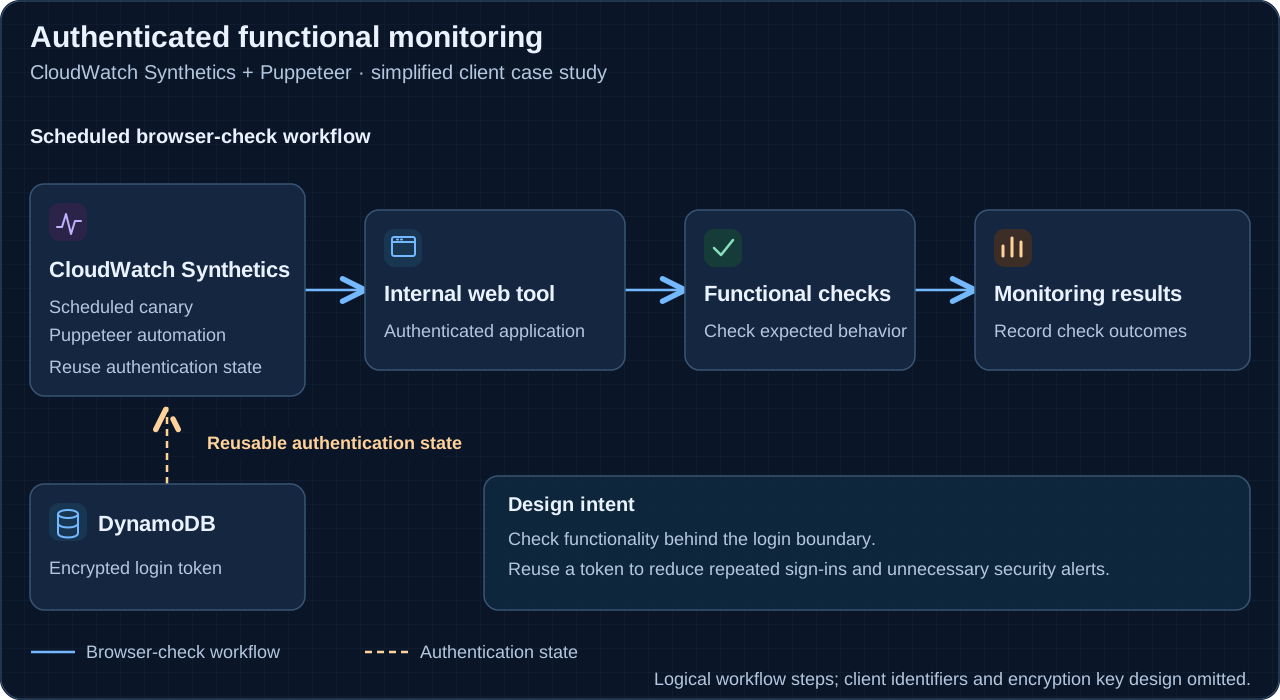
I used Amazon CloudWatch Synthetics with Puppeteer to sign in and check functionality inside the application. This brought the monitoring closer to the path an authenticated user depends on.
Keep authentication from dominating the check
Repeatedly performing a fresh login can create unnecessary authentication traffic. In this project, I reused a login token and stored it encrypted in DynamoDB so the automation could retain authentication state between checks.
The aim was to reduce repeated sign-ins that could trigger the client’s security alerts. The design kept attention on the application’s functionality while reducing the need to repeat the entire login flow for each check.
Why Puppeteer and Synthetics
Puppeteer supplied the browser automation needed to work with the authenticated interface. CloudWatch Synthetics supplied the canary execution and monitoring framework. Together, they made it possible to check behavior inside the tool rather than infer application health from a reachable page.
The important distinction is between a successful login and a successful functional check. Authentication is a prerequisite; the monitoring still needs to exercise the behavior it is intended to verify.
What this demonstrates
This project connects browser automation, synthetic monitoring, and authentication-state handling. My contribution was making an internal, login-protected workflow observable through automated functional checks, with encrypted token persistence supporting reuse.
Related documentation
Primary references for the technologies discussed. The case study describes my work; these references explain the underlying tools.

DevOps, infrastructure automation, and practical engineering.
Connect on LinkedIn