A useful delivery pipeline answers four questions: what source was tested, what artifact was produced, who can deploy it, and how a previous release can be restored. A green status is valuable only when those answers match the intended delivery path.
Visual reference / Standards
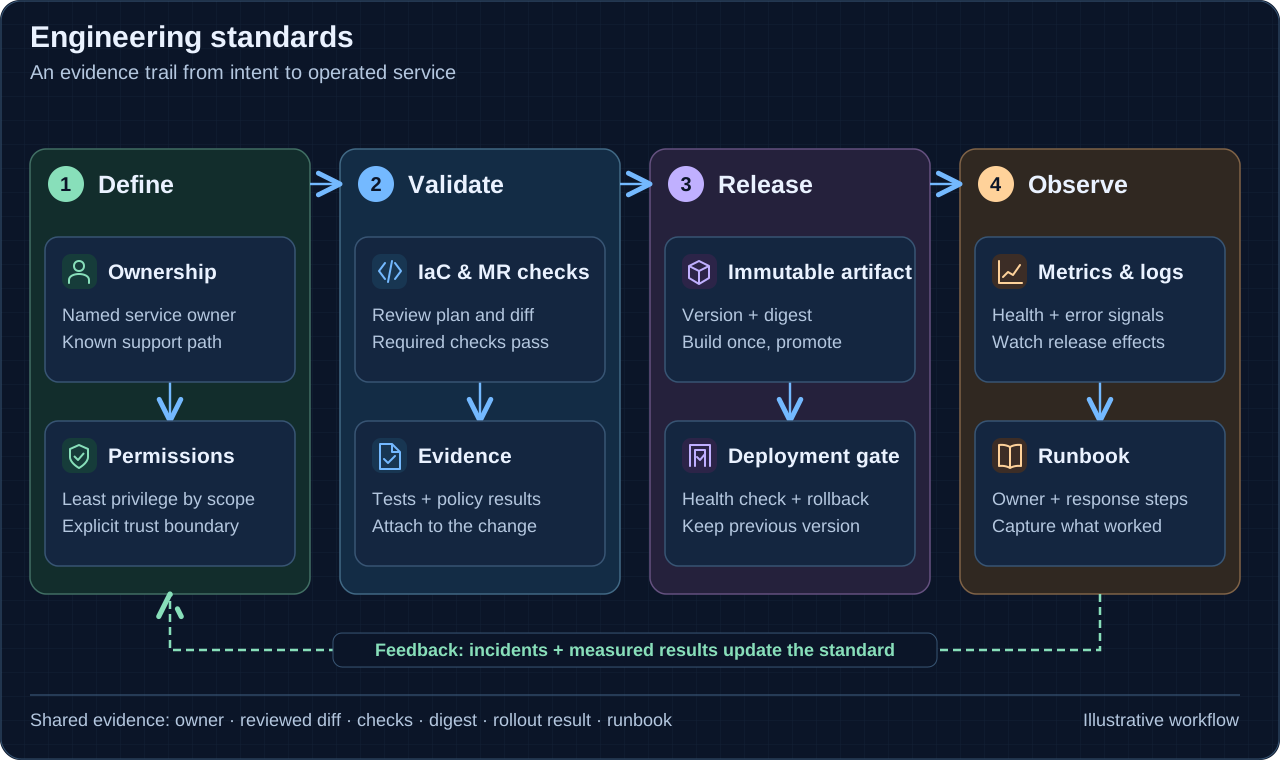
- Define the contract
Record ownership, access scope, expected behavior, and the conditions for a successful release.
- Validate the change
Review infrastructure and application changes, then run relevant tests and policy checks.
- Identify the release
Retain the source commit, pipeline result, and immutable artifact identifier.
- Release with a recovery path
Use deployment gates, verify health and the real request path, and keep the previous release available.
- Observe and improve
Use metrics, logs, and runbooks to feed operational evidence into the next change.
This article describes a review method for GitLab CI/CD. The snippets use fictional scripts and environments; they illustrate the configuration relationships to validate rather than a complete deployment system.
Decide which pipelines should exist
Use workflow: rules to control pipeline creation and job rules to control which work belongs in each pipeline. They solve different problems. An apparently simple rule accepting branch pushes can overlap with merge-request rules and produce duplicate pipelines for one change.
Write down the expected outcomes for merge requests, default-branch pushes, tags, scheduled pipelines, and manually started pipelines. Validate that matrix with the project’s actual includes and variables. GitLab evaluates workflow rules before jobs, and job rules in order until a match. Its workflow guide and job rules guide explain the distinction.
Connect tests to the artifact being deployed
Build once and give the result an immutable identity, such as a versioned package or container image digest. Record the source commit and pipeline that created it. Deploying from a moving “latest” reference can make a successful earlier test irrelevant to the bytes that reach the server.
Job artifacts are useful for passing build output within a pipeline. Preserve release outputs with a retention strategy appropriate to deployment and rollback; a branch’s latest artifact is not a permanent release identity. GitLab’s artifact documentation describes their lifecycle and recommends registries for release packages and images.
Make dependency behavior explicit
needs changes scheduling: a job can become eligible before every earlier-stage job finishes. When it uses needs, artifact downloads are limited to the listed dependencies. Treat that relationship as part of the release design, not only a performance improvement.
deploy_staging:
  stage: deploy
  needs:
    - job: build_release
      artifacts: true
    - job: integration_test
      artifacts: false
  environment:
    name: staging
  resource_group: staging
  script:
    - ./ci/deploy.sh release-manifest.json
    - ./ci/verify.sh staging
Here the deploy job waits for both named jobs and downloads the build’s artifacts. Its scripts must verify the manifest and deploy the referenced release. Keep producer and consumer rules compatible: a required job omitted from the pipeline can make a need invalid. Mark a need optional only when proceeding without that job is intentional. Consult the YAML reference for the exact behavior.
Separate a manual gate from deployment authority
If a release requires a blocking manual job, state allow_failure: false explicitly. Manual jobs outside rules default to optional, while manual jobs created within rules default to blocking. An explicit setting makes the intended gate easier to review.
A manual button does not by itself define who should hold production access. Configure environment protection and allowed deployers where those features are available; GitLab’s protected environments require Premium or Ultimate. The manual job documentation and protected environments guide cover those controls.
Give the job a bounded cloud identity
For AWS, GitLab ID tokens can be exchanged through STS for temporary credentials. Match the token audience to the identity provider configuration and constrain the role’s trust policy to the intended project and reference. Give the resulting role only the deployment operations and resources it needs.
Keep four identities distinct during diagnosis: the runner that executes the job, the GitLab context authorizing it, the cloud role used by deployment commands, and the identity the application uses after deployment. Success at one boundary does not verify the others. GitLab’s AWS OIDC integration guide documents the token exchange.
Serialize the change and verify the result
A resource_group can prevent competing deployment jobs from changing one environment simultaneously. It does not make a script idempotent or validate the release. Select the queue behavior deliberately and retain a usable previous release.
After deployment, check the running release identity and an application-level health signal. Record whether a release was built, deployed, and verified as separate observations. Exercise recovery using retained artifacts and compatible configuration before it becomes urgent. GitLab’s resource group documentation explains the concurrency control; the recovery procedure remains part of the application’s design.
Source documentation
Primary references for the concepts and examples in this note.

DevOps, infrastructure automation, and clear paths from an idea to an operable system.
Connect on LinkedIn