A useful access policy starts with a concrete sentence: this identity needs to perform these operations on these resources in this namespace. That sentence gives a reviewer something to verify. A role named “automation” does not explain whether its owner should read Pods, restart Deployments, or retrieve credentials.
Visual reference / RBAC
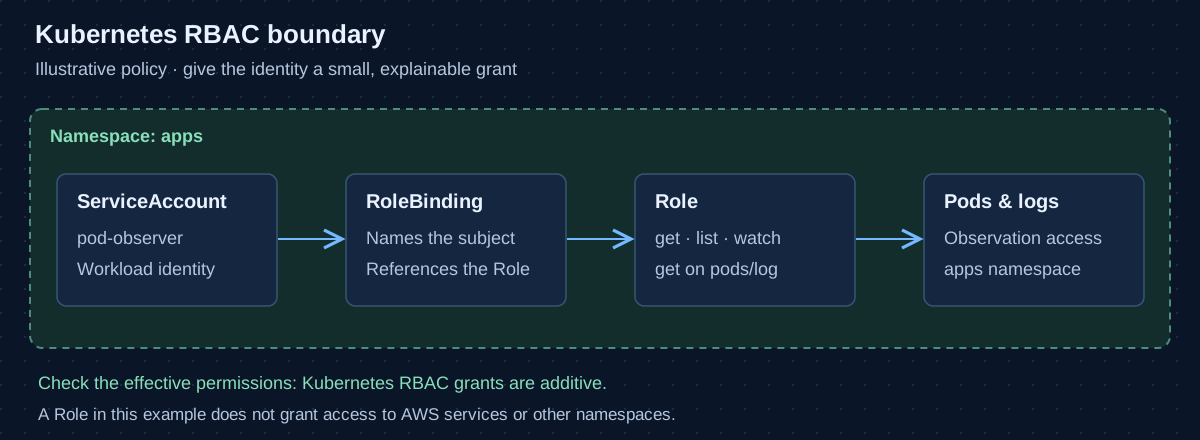
- Identity: ServiceAccount
The workload runs as apps:pod-observer. Identity alone does not grant permissions.
- Connection: RoleBinding
The binding names the subject and points to the Role in the apps namespace.
- Permissions: Role
Allow get, list, and watch on Pods, plus get on the pods/log subresource.
- Scope: apps namespace
The grant applies to the named namespace. Check other bindings too: RBAC grants are additive.
This guide uses a fictional application namespace named apps and a ServiceAccount named pod-observer. The example grants observation rights. It is a starting point for review, not a policy to apply unchanged to an existing cluster.
Separate identity, permissions, and scope
A ServiceAccount identifies a workload. A Role declares permissions within a namespace. A RoleBinding connects a subject to those permissions. A ClusterRole is cluster-scoped, but a RoleBinding can grant its namespaced permissions within one namespace. The binding determines how that reusable policy is applied.
Kubernetes RBAC permissions are additive: another binding can grant access that a narrowly written Role omits. There is no deny rule to cancel that grant. Review the identity’s effective permissions and relevant bindings, not just the new manifest. The RBAC reference explains these object relationships.
Make a small policy readable
Suppose an observer needs to inspect Pods and retrieve their logs. It does not need to edit workloads, read Secrets, or create an interactive shell. Write those requirements explicitly:
apiVersion: v1
kind: ServiceAccount
metadata:
  name: pod-observer
  namespace: apps
---
apiVersion: rbac.authorization.k8s.io/v1
kind: Role
metadata:
  name: pod-observer
  namespace: apps
rules:
  - apiGroups: [""]
    resources: ["pods"]
    verbs: ["get", "list", "watch"]
  - apiGroups: [""]
    resources: ["pods/log"]
    verbs: ["get"]
---
apiVersion: rbac.authorization.k8s.io/v1
kind: RoleBinding
metadata:
  name: pod-observer
  namespace: apps
subjects:
  - kind: ServiceAccount
    name: pod-observer
    namespace: apps
roleRef:
  apiGroup: rbac.authorization.k8s.io
  kind: Role
  name: pod-observer
The empty API group identifies core resources. Logs use the pods/log subresource, so permission to retrieve a Pod does not silently stand in for every operation involving that Pod. Keeping rules short also makes a later expansion visible in code review.
Test the permission boundary
Use kubectl auth can-i to check an operation under the intended identity. The person running an impersonation check must themselves have permission to impersonate that identity. An administrator’s successful command under their own account says little about a workload’s access.
kubectl auth can-i list pods -n apps   --as=system:serviceaccount:apps:pod-observer

kubectl auth can-i get pods --subresource=log -n apps   --as=system:serviceaccount:apps:pod-observer

kubectl auth can-i delete pods -n apps   --as=system:serviceaccount:apps:pod-observer

kubectl auth can-i list pods -n another-namespace   --as=system:serviceaccount:apps:pod-observer
With only the example grant in place, the first two checks should succeed and the last two should not. Unexpected access is a reason to inspect existing bindings. These authorization checks do not prove that a container has the right mounted token, network path, application configuration, or cloud permissions. See the command reference for supported checks.
Review powers hidden behind ordinary verbs
Avoid wildcard resources and verbs when a finite list describes the job. A wildcard can include future resource types or operations. Also examine what a permission enables indirectly: creating workloads can expose mounted data and the privileges of ServiceAccounts available to those workloads.
Reading Secrets deserves particular attention. list and watch can reveal their contents as well as get. Kubernetes documents these and other escalation paths in its RBAC good practices. A resource name that sounds operational is not a substitute for understanding its API behavior.
Give each workload an intentional identity
Assign a dedicated ServiceAccount when a workload needs Kubernetes API access. Where the application does not use that API, consider disabling automatic token mounting with automountServiceAccountToken: false. This is a workload-specific decision: turning it off for an API client prevents the client from receiving its expected credentials.
Keep Kubernetes authorization separate from cloud identity. A Kubernetes Role does not grant access to an S3 bucket, and an AWS IAM role does not automatically grant permission to list Kubernetes Pods. The ServiceAccount documentation describes the Kubernetes side of that boundary.
Keep the policy connected to its purpose
Record the workload owner, required operations, and review conditions alongside the configuration. Revisit permissions when the workload changes or is removed. During review, ask for evidence of both the needed operation and the intended boundary. A small, explainable grant is easier to maintain than an unexplained collection of exceptions.
Source documentation
Primary references for the concepts and examples in this note.

DevOps, infrastructure automation, and clear paths from an idea to an operable system.
Connect on LinkedIn